
Every time I download a settlement report or any other report from Meesho, it’s very hard to find what I’m looking for. When you’re selling a physical product with small profit margins, you have to know where the money goes and where it comes from, or else there will be no profit.
So I made this settlement checker to make it easy for you to understand your net payout. You just have to match the columns in your sheet to the tool below.
Meesho settlement checker
Type in one order’s numbers from your Meesho payment sheet. See what the settlement should be, and whether Meesho paid you right.
Copy the numbers as they are. A minus sign in front of a charge is fine, the checker reads it either way.
- Sale after returns
- –
- Shipping and fees
- –
- TCS and TDS
- –
- Claims minus recovery
- –
- Settlement should be
- –
Show the working
Last checked 28 Oct 2026: TDS 0.1% (Income Tax Act) and GST TCS 0.5% (GST law) of the sale value before GST, with no TCS on GST-exempt goods. No shipping fee on RTOs (Meesho supplier page). Estimates only.
How to download the Meesho payment sheet
In the Meesho supplier panel, open Payments. The page shows your upcoming and completed payments by date. The purple Download button at the top right gives you the payment file. Pick the dates you want, and it downloads as an Excel file.
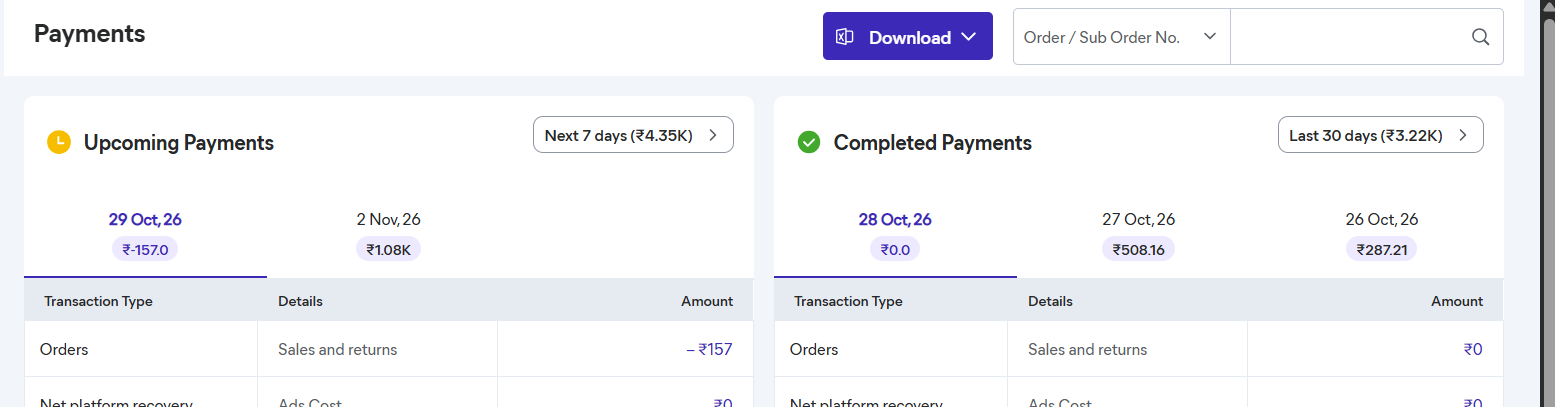
The file is an Excel sheet with five tabs: Disclaimer, Order Payments, Ads Cost, Referral Payments and Compensation and Recovery. The dates of the payment period are in the file name, so it’s easy to tell two downloads apart. Mine covers payments from 1 to 27 October 2026.
If you don’t run Meesho ads and haven’t referred anyone, the last three tabs will just say “No data is available for these dates.” Mine did. Everything that matters is in Order Payments, one row for each order.
43 columns, and only 6 of them moved money
The Order Payments tab has 43 columns. That looks scary the first time. But on my 22 orders (18 delivered, 3 RTOs and 1 customer return), every money column was 0 except these six:
| Column | What it means | What mine showed |
|---|---|---|
| Final Settlement Amount | What reaches your bank for this order | ₹92.39 to ₹141.70 on delivered orders, ₹0 on RTOs, −₹157 on the return |
| Total Sale Amount (Incl. Shipping & GST) | What the buyer paid, product plus shipping | ₹127 to ₹211 |
| Total Sale Return Amount (Incl. Shipping & GST) | The same amount again as a minus, when the order comes back | Only on the RTOs and the return |
| Shipping Charge (Incl. GST) | What Meesho charges you for delivering the order | −₹20.16 to −₹71.98 |
| Return Shipping Charge (Incl. GST) | What you pay when a customer sends it back | −₹157 on my one return |
| TDS | 0.1% income tax, which you can claim back | −₹0.13 to −₹0.21 |
Meesho Commission, the fixed fee, the warehousing fee, the gold and mall platform fees, support service charges, TCS, compensation, claims and recovery were 0 on every order. Meesho really does take 0% commission. That doesn’t mean you get your full price, though, and the reason is the Shipping Charge column.
The Shipping Charge column is the one to watch
All 22 orders were the same plant, Cats Claw Creeper, in the same packing. I expected the shipping charge to be about the same every time. It wasn’t. It went from ₹20.16 on one order to ₹71.98 on another.
The buyer’s price moved too. For a listing price of ₹113, buyers paid anywhere from ₹137 to ₹160. The part above ₹113 is the shipping the buyer pays. Then Meesho takes its Shipping Charge out of my payout, and that charge was always a bit more than what the buyer paid for shipping:
| Buyer paid | Above my ₹113 price | Meesho’s Shipping Charge | I got |
|---|---|---|---|
| ₹141 | ₹28 | ₹36.10 | ₹104.76 |
| ₹142 | ₹29 | ₹37.46 | ₹104.40 |
| ₹150 | ₹37 | ₹47.62 | ₹102.23 |
| ₹152 | ₹39 | ₹49.80 | ₹102.05 |
| ₹160 | ₹47 | ₹55.46 | ₹104.38 |
On all 18 delivered orders, the Shipping Charge was between ₹7.20 and ₹11.16 more than the shipping part the buyer paid. The average was ₹8.87. So with 0% commission, I still got about ₹9 less than my listing price on every delivered order. Over the 18 orders, my listing prices added up to ₹2,184, and Meesho paid me ₹2,021.50. That’s ₹162.50 less.
₹9 sounds small. On a ₹113 plant, it’s 8% of the price, and it’s there on every order. If you price your product thinking “0% commission means I get my full price”, you’re pricing ₹9 too low. When you work out your profit, start from what Meesho actually pays you, not from your listing price. The Meesho profit calculator asks for your settlement for exactly this reason.
One more thing about this column. The Disclaimer tab of the sheet says the amounts “are estimated figures which are subject to change, upon determination of logistics costs based on allocation of order to authorised courier partner.” In plain words, the shipping charge depends on which courier gets your order, and it can change. That’s one more reason to check your settlements and not just trust the total.
PREMIUM_RETURN and BASIC: why one product has two prices
The Price Type column says either PREMIUM_RETURN or BASIC, and I had no idea what that meant the first time. My sheet shows the answer once you put the two side by side. The same plant sold at two listing prices, ₹12 apart:
- PREMIUM_RETURN: ₹113 (9 orders) and ₹150 (5 orders)
- BASIC: ₹101 (6 orders) and ₹138 (2 orders)
As far as I remember, when I listed this plant, Meesho asked me for two prices: the normal Meesho Price, and a lower Wrong/Defective Returns Price. A buyer who picks the lower price can only return the product if it’s wrong or defective. A buyer who pays the normal price can return it for any reason. In the sheet, the normal price shows up as PREMIUM_RETURN and the lower one as BASIC.
The ₹12 difference does reach you. My ₹113 orders paid me ₹102.05 to ₹105.66, and my ₹101 orders paid ₹92.39 to ₹93.49. And my one customer return came from a PREMIUM_RETURN order, which is what you’d expect, since those are the buyers who can return for any reason. Meesho’s returns dashboard even shows a separate return rate for each price, under “Dual Pricing”.
The letters in the formula don’t match Excel’s letters
Under the Final Settlement Amount header, Meesho writes the formula: (B + C + G + H + I + L + Q + R + S + T + U + V + W + Y + AA + AD + AF + AX). When I tried to add up those Excel columns, nothing matched.
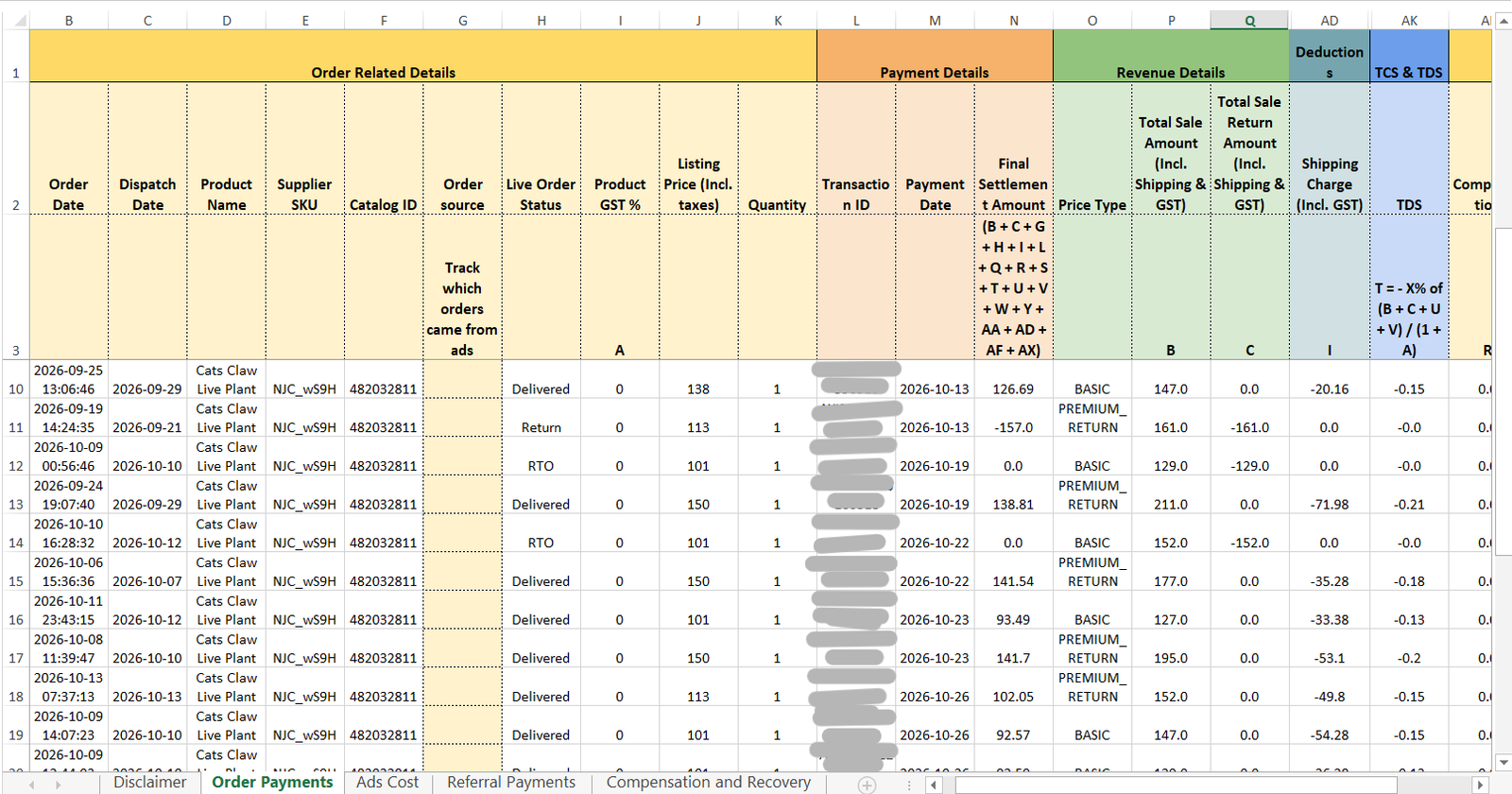
That’s because these aren’t Excel’s column letters. Look at the small row of letters just under the headers. That row is Meesho’s own labelling. Total Sale Amount sits in Excel column P, but Meesho labels it B. Shipping Charge sits in column AD, but Meesho labels it I. So read the letter under each header, not the letter at the top of the Excel screen.
Once I did that, the formula added up on all 22 of my orders, to the paisa. For most sellers it comes down to this:
Final Settlement = Total Sale Amount + Total Sale Return Amount
                   − Shipping Charge − Return Shipping Charge
                   − fees − TCS − TDS + claims − recovery
That’s what the checker above does. While you check, watch for two things that need a ticket: an RTO with a shipping charge (Meesho says RTOs carry no shipping fee), and a delivered order with a return shipping charge. The checker flags both.
TCS and TDS in the sheet
Both are worked out on the sale value before GST. TDS is 0.1%, so my ₹141 order shows ₹0.14. On RTOs and returns the sale and the return cancel out, so TDS is 0.
The TCS header still says 1%, but GST TCS has been 0.5% since 10 July 2024. Mine is 0 because live plants are GST-exempt. Both can be claimed back, and the TCS and TDS calculator explains how.
Check every new payment sheet
Once you know your actual settlement amounts, you can adjust your listing prices to absorb the hidden costs of shipping and returns. Bookmark this page and check your numbers every time you download a new settlement report. I hope this helps you.
Frequently asked questions
Why is my Meesho payment less than my price when commission is 0%?
Because of the Shipping Charge. Meesho’s shipping charge is usually a little more than the shipping part the buyer pays. On my orders, it was ₹7 to ₹11 more, so I got about ₹9 less than my listing price on each delivered order.
What do PREMIUM_RETURN and BASIC mean in the Meesho payment sheet?
They show which of your two prices the buyer paid. PREMIUM_RETURN is your normal Meesho Price, where the buyer can return for any reason. BASIC is the lower Wrong/Defective Returns Price, where the buyer can only return a wrong or defective item.
Why don’t the formula letters match my Excel columns?
The letters in the formula are Meesho’s own labels, shown in the small row under each header. They aren’t Excel’s column letters. For example, Total Sale Amount is labelled B but sits in Excel column P.
More tools for online sellers
- Meesho profit calculator with RTO and returns
- TCS and TDS calculator for Amazon, Flipkart and Meesho sellers
- Volumetric weight calculator
Where these numbers come from
Every order number in this post comes from my own Meesho payment sheet, for payments between 1 and 27 October 2026. The column names and the settlement formula are Meesho’s own, from the same file. The rule that RTOs carry no shipping fee is from Meesho’s supplier page on shipping, checked on 27 October 2026. The TDS rate (0.1%) is from the Income Tax Act, and the GST TCS rate (0.5% since 10 July 2024) is from CGST Notification 15/2024. Order and transaction IDs are blurred in the screenshots.